An Overview of the Review Area
The Review App is an effective way for your business to gain attention through user reviews. You can add links to your website, post them on social media and distribute them on printed materials via QR codes. The Review App gives you control over your reviews too. If you do get less than awesome feedback you have the opportunity to respond directly to the reviewer.
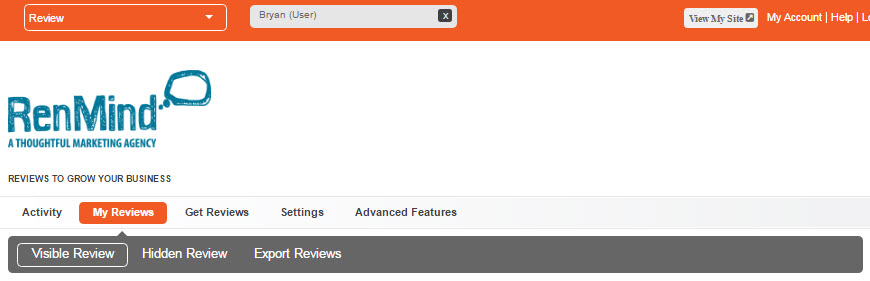
It’s super easy to get new reviews and share them with the world, so we’re going to start with a quick intro to the interface.
Overview of Program Areas
My Reviews
This area allows you to see all of the reviews your customers left about you. It’s split up into three main parts:
- Visible Reviews – In the Settings area (we’ll get back to that later) you can set the criteria you want for automatically displaying new reviews. And you’re not limited, you can make any review you receive visible when you want to.
- Hidden Reviews – This is where reviews that didn’t meet the criteria you set are kept. If you received a less than stellar review this is your chance to contact that person and iron things out. But remember, bad reviews are going to happen. You can make any of the reviews in this area visible by clicking the “Show” button.
- Export Reviews – This area lets you download a .CSV format spreadsheet with all of the information included in your feedback. This means reviewer names, email addresses and all of their rankings and answers.
Visit the following link for more in-depth information on the My Reviews area.
Get Reviews
This area is all about asking for and distributing reviews. Here’s the three main parts to the Get Reviews area:
- Send an Email – This is where you can ask people to review you by single email. If you just completed a job or had a satisfied customer come in, use this area to ask them for some great feedback. Just enter in their name and email with a message (you can also have a default message). You can also use variables to include their name and a link to your existing reviews.
- •Get a Website Button – This is where code snippets are kept that include icons that link to your “Leave a Review” and “Read Our Reviews” landing pages. You can embed these codes in your website. You may have to contact your web developer if you’re unsure.
- Get a Web Link These links are a simple way to share your “Leave a Review” and “My Reviews” landing pages in emails, social media… anywhere really.
Visit the following link for more in-depth information on the Get Reviews area.
Settings
The Settings area gives you a few options. This is where you control your review content, response messages, and automatic approvals. These are the three main parts of this option:
- Customize Review Form – Here you can make your review forms ask the questions you want. You can set labels for star rankings, a recommend scale and a question customers can fill out. You can also set a Thank You message that’s generated directly after a reviewer leaves her comments.
- Email Customization – This is where you set your default review request. If you don’t want to keep typing a message into your Send and Email areas, you can fill this out and save it, and use the same message for every request.
- Auto Review Approval – The approval area gives you control on screening reviews. You can set it to keep reviews hidden until you approve them, show all reviews automatically or show them if they are only over a certain star ranking.
Visit the following link for more in-depth information on the Settings area.
Advanced Features
This lets you send out an automatic than you message to anyone who leaves a review. Just check the box and you can set a default message.
- Smart Reply
- Get an Email Signature – Generating an email signature is really easy. If you set a logo and personal image in your RenMind Network Core area they will automatically show up along with your company information and two icon links to your reviews. Just copy the code, visit your email service provider’s signature area and paste it in.
- Embed Reviews – If you want to embed your reviews on your site or blog you can do it here. All of your approved reviews will appear on a page on your website, so you can share your glowing feedback with everyone.
- Get a QR Code – This option allows you to have two automatically generated QR codes to display in email and on printed materials. Anyone with a smart phone will be able to access your reviews instantly. Click this link for more on QR Codes.
Using the Review App is that easy! We have a lot more material on this app and more in the Knowledge Base. For more information on any specific Review App areas click one of the links above. Thanks for reading and if you have any feedback, leave it here.